Copyright © 1998-2017 Luca Gallina


Runmode, programming Siemens PLCs
Free tools, hints, tips and tricks. Interesting and specialized applications are also on sale, all developed by programmers for programmers.
S7 I/O Speaking assistant
An event-driven speaking assistant
Buy now!
How to order
We accept PayPal or wire transfer payments.
Contact us by email or use the “buy now” button.
Prices
Are you a PLC programmer or an electrician?
How many times have you had to walk back and forth to check for the right PLC wiring of all limit switches, sensors, push buttons, selectors, etc?
Now you can count on Runmode's S7 I/O Test Assistant!
This smart utility keeps constantly an eye on the whole PLC input area, and if any change is detected:
- It speaks the input address (e.g. "input one five two dot four, off"), so you can test the inputs without having to look at the PLC cards or having anybody doing it for you.
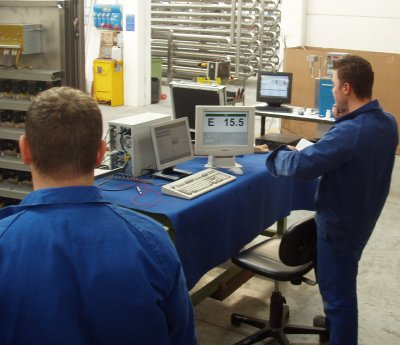
- It displays the input address in wide characters on the screen, along with its logical status, so you can easily read it from distance.
- It checks the inputs activation sequential order, so you can just check your electric drawings page after page while testing the inputs, being alerted if you skipped a point.
- It logs all the activities both to a on-screen list box and to a text file that can be analyzed at a later time, printed and attached to your commissioning report.
More, the S7 IO Test Assistant helps you even when you need to test the digital outputs, turning on and off outputs at your precise command.

Requirements
- S7 I/O Speaking Assistant relies on Siemens PRODAVE additional package to communicate with the PLC via MPI interface such are CP5511, CP5512, RS232/MPI adapter, USB/MPI adapter or any communication mean compatible with Siemens Step7 programming package.
- S7 I/O Speaking Assistant is compatible with Prodave version 3.0 or higher, Prodave "Mini" version cannot be used.
- Siemens Prodave is not supplied with S7 I/O Speaking Assistant
Current version of S7 I/O Speaking Assistant is suitable for S7-300/-400 PLCs only, it cannot be used with S7-200 family.
Shipping and billing
The program, registration code and invoice will be sent via e-mail upon payment.
We normally deliver within 24 hours from payment.