Copyright © 1998-2017 Luca Gallina

Runmode, programming Siemens PLCs
Free tools, hints, tips and tricks. Interesting and specialized applications are also on sale, all developed by programmers for programmers.
S7 Speaking Events
Buy now!
How to order
We accept PayPal or wire transfer payments.
Contact us by email or use the “buy now” button.
Prices
An event-driven speaking assistant
Tired of operations activated by the operator without notice?
Tired to watch and wait for an event that could take place within minutes or hours?
Want to be reliably alerted when some events occur, so you can concentrate on other parts of your work?
Purpose of this tool: to provide audible warnings, allowing S7-300/400 PLC programmers to concentrate on other details while awaiting for an event to happen.
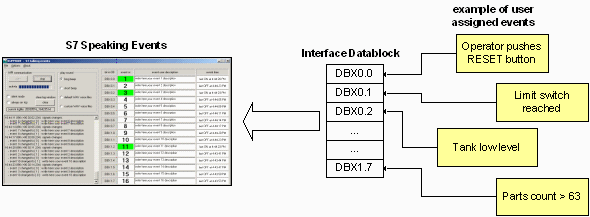
This smart utility monitors continuously up to 16 different events assigned to a datablock word, alerting the programmer by playing customizable WAV sound files. It also highlights the events on screen so they are visible from distance without rolling the eyes on the Step7 tiny "monitor PLC variables" window.
Last but not least, all events are logged to a text file so they can be analyzed at a later time.
Anyway please note that S7SpeakingEvents may not be used as a data logger, since the communication rate is not deterministic.
Programming events detection in PLC
The PLC programmer must add some instructions to the PLC program in order to capture the events and store them into the interface datablock. This technique is very flexible since it allows the monitoring of slow and fast events as well.
Requirements
- S7 Speaking Events relies on Siemens PRODAVE additional package to communicate with the PLC via MPI interface such are CP5511, CP5512, RS232/MPI adapter, USB/MPI adapter or any communication mean compatible with Siemens Step7 programming package.
- S7 Speaking Events is compatible with Prodave version 3.0 or higher, including Prodave "Mini" version.
- Siemens Prodave is not supplied with S7 Speaking Events
Current version of S7 I/O Test Assistant is suitable for S7-300/-400 PLCs only, it cannot be used with S7-200 family.
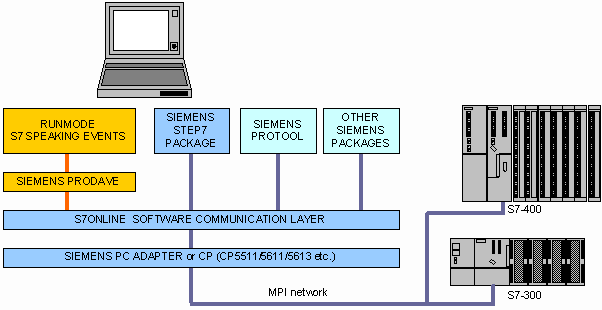
S7SpeakingEvents needs the Siemens PRODAVE package to communicate with the PLC via MPI or DP interface. Prodave is a tiny DLL that provide connection between a custom application (the S7SpeakingEvents program) and the S7online communication layer.
Use Prodave MPI version 3.0 and higher, the " Prodave Mini" version is fully compatible with S7SpeakingEvents.
Prodave is not supplied with S7SpeakingEvents.
Slow event:
| Limit switch DB99.DBX0.0
|-------| |----------------( )
|
Fast event capturing:
| Limit switch DB99.DBX0.1
|-------| |----------------( S )
|
Complex event:
| push button limit switch comparison DB99.DBX0.2
|-------| |-------|\|----------| value > 63 |----+------( S )
| |
| Low tank level on-delay timer |
|-------| |--------+---| 15sec |-----------------+
| |
| safety switch |
|-------| |--------+
|
|
| reset button DB99.DBX0.2
|-------| |----------------------------------------------( R )
|
|
Shipping and billing
The program, registration code and invoice will be sent via e-mail upon payment.
We normally deliver within 24 hours from payment.